學習 · 面試考題
Class Components 介紹
請直接參考我寫的網站
Class Component 生命週期
在 React 當中,現在有兩種 components。分別是 Class component、Function component(或稱作 Stateless component)。
基本上已經要淘汰啦~~
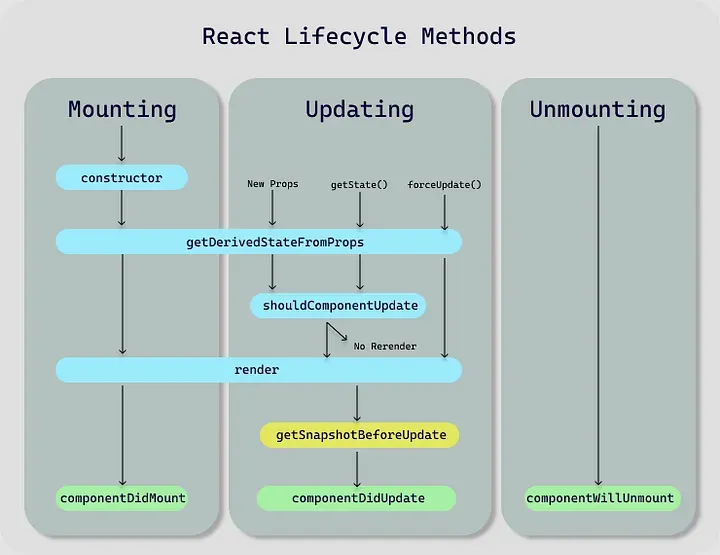
Class Component 生命週期
React | 為了與 Hooks 相遇 - Function Components 升級記Hooks 的出現,改變了 Function Components ,讓他擁有專屬的 useState 來管理狀態及 useEffect 的生命週期。 兩種版本呈現的結果都一樣,差別在於設定及修改 State 的部分使用 Hooks 建立,需要注意的是 Hooks … https://medium.com/enjoy-life-enjoy-coding/react-為了與-hooks-相遇-function-components-升級記-86869d869a45
React的Component生命週期分為三個階段: Mounting, Updating 和 Unmounting。
- Mounting:
當 React 將一個 DOM 元素插入到頁面上時,會經歷以下步驟:
-
constructor(props):初始化 state 和繫結方法
-
static getDerivedStateFromProps(props, state):根據接收到的 props 更新 state
-
render():返回要渲染的元素列表
-
componentDidMount():在元件第一次掛載完成後呼叫
- Updating:
當 React 檢測到一個元件的 props 或 state 發生改變時,會經歷以下步驟:
-
getDerivedStateFromProps(nextProps, prevState):根據接收到的 props 更新 state
-
shouldComponentUpdate(nextProps, nextState):判斷是否需要更新元件,返回 true/false
-
render():返回要渲染的元素列表
-
getSnapshotBeforeUpdate(prevProps, prevState):在更新前獲取 DOM 的快照
-
componentDidUpdate(prevProps, prevState, snapshot):在更新後操作 DOM,如新增動畫或傳送網路請求
- Unmounting:
當 React 從 DOM 中將一個元素移除時,會呼叫 componentWillUnmount() 方法。
- componentWillUnmount():元件將被解除安裝時呼叫,可以用來取消計時器、清除資源、解除事件繫結等操作。
Component 的生命週期提供了很多方法,開發者可以利用它們在不同的階段做各種操作,例如處理非同步的資料載入、最佳化 rendering 效能、手動設定 state 等等。
更詳細的每一步驟介紹
Mounting
在React Component生命週期中,Mounting階段是元件被掛載到DOM上的過程,以下為詳細介紹:
constructor
首先會執行constructor方法,在class component中可以在constructor中定義state和初始化class屬性,例如:
class MyComponent extends React.Component {
   constructor(props) {
      super(props);
      // state 可以用來存储组件内变化的数据
      this.state = {counter: 0};
   }
}getDerivedStateFromProps
接下來是 getDerivedStateFromProps() static lifecycle方法,這是一個新的React生命週期方法,從props更新Component的state。此方法會在constructor之後在渲染前呼叫,而且需要有static修飾符定義, 如果在Mounting階段不需要從props派生state可省略。
class MyComponent extends React.Component {
 static getDerivedStateFromProps(props, state) {
// ...
 }
}render
render() 函式是 class component 中必須實現的一個方法,用於返回 React element。此方法透過JSX產生虛擬 DOM 樹,再將虛擬 DOM 轉換為真實的DOM容器元素。
class MyComponent extends React.Component {
  render() {
    return <div>Hello, World!</div>;
  }
}componentDidMount
最後是 componentDidMount() 方法,它會在元件渲染完畢之後立即呼叫。 在這個方法中,你可以執行類似獲取網路資料、啟動定時器等非同步操作。
class MyComponent extends React.Component {
  componentDidMount() {
// network request/ 真实DOM 操作/ 启动计时器
  }
  render() {
    return <div>Hello, World!</div>;
  }
}這些是 Mounting 過程中會執行的方案,可以讓我們更好了解 React 的 component 結合 LifeCycle 之後的時序和使用方式。
Example
class MyComponent extends React.Component {
  constructor(props) {
    super(props);
    console.log('constructor');
    this.handleClick = this.handleClick.bind(this);
    this.state = {
      name: 'Mark',
    }
  }
  handleClick() {
    this.setState({'name': 'Zuck'});
  }
  componentWillMount() {
    console.log('componentWillMount');
  }
  componentDidMount() {
    console.log('componentDidMount');
  }
  componentWillReceiveProps() {
    console.log('componentWillReceiveProps');
  }
  componentShouldUpdatte() {
    console.log('componentShouldUpdatte');
  }
  componentWillUpdate() {
    console.log('componentWillUpdate');
  }
  componentDidUpdate() {
    console.log('componentDidUpdate');
  }
  componentWillUnmount() {
    console.log('componentWillUnmount');
  }

  render() {
    return (
      <div onClick={this.handleClick}>Hi, {this.state.name}</div>
    )
  }
}

ReactDOM.render(<MyComponent />, document.getElementById('app'));

// 依序會印出
// "constructor"
// "componentWillMount"
// "componentDidMount"
// 當你click div後
// "componentWillUpdate"
// "componentDidUpdate"

// Unmount是不會出現的 除非我們去卸載Updating
在React中,更新(Updating)是指component因為props或state的改變而進行的重新渲染(re-rendering)過程。一個component的更新可以分為以下三個步驟:
- shouldComponentUpdate(nextProps, nextState)
當一個component接收到新的props或者setState()被呼叫時,就會進入shouldComponentUpdate函式 checking 階段。該函式需要傳入nextProps和nextState兩個引數。假如shouldComponentUpdate回傳false,那麼component將不會進入下面的render()以及其後的階段。
在更新期間,shouldComponentUpdate會被呼叫多次。這時候應盡量提高判斷效率和細心地處理好資料量較大的情況。
- render()
在shouldComponentUpdate返回true之後,React就會呼叫render()函式進行重新渲染。
- componentDidUpdate(prevProps, prevState)
當render()完成後,React就會跑到componentDidUpdate函式內(當第一次掛載(componentDidMount)時不會呼叫此函式)。這時我們能夠拿到前一個props和state的值(this.props及this.state),適合於根據前後狀態差異性別執行其他邏輯。舉例來說:如果你需要更新網頁Title內容,可以在componentDidUpdate中完成這個操作。