學習 · 前端框架
Ladle 前端測試工具
目錄 · 5 個段落
Ladle — 輕量版 Storybook
TL;DR元件 playground / dev-only 預覽工具,看 component 在不同 props / state 下的樣子。比 Storybook 輕巧 100 倍,基於 Vite,啟動快、設定少。只在 dev 環境用,不會打進 production bundle。
為什麼需要這類工具
開發 component 時,你想快速看:
-
Button 在
disabled/loading/ 各種顏色的樣子 - Modal 在不同尺寸、有/無 footer 的版型
- Card 在 hover / focused / dragging 狀態
如果每次都跑回真實頁面找入口、觸發狀態 → 超慢。Ladle 的 *.stories.tsx 機制讓你寫一次就能在獨立頁面切換不同 state。
Storybook vs Ladle 對比
| 項目 | Storybook | Ladle |
|---|---|---|
| 啟動速度 | ⏳ 慢(Webpack-based) | ⚡ 超快(Vite-based) |
| Bundle 大小 | 重(完整生態) | 輕(僅核心) |
| 套件生態 | 豐富(addons) | 較少 |
| 設定難度 | 多 | 幾乎零設定 |
| API 相容 | ⭐ 業界標準 | 可直接用 Storybook 的 *.stories.tsx |
| 視覺回歸測試 | 內建 | 要自己接 |
何時選 Ladle個人專案 / 小團隊 / 只想要 component playground → Ladle。需要完整 design system docs / 多 addon 整合 → Storybook。
安裝與用法
npm install --save-dev @ladle/react加 npm script:
{
  "scripts": {
    "ladle": "ladle serve",
    "ladle:build": "ladle build"
  }
}寫一個 story:
// src/components/Button.stories.tsx
import { Button } from './Button';

export const Default = () => <Button>Click me</Button>;
export const Disabled = () => <Button disabled>Click me</Button>;
export const Primary = () => <Button variant="primary">Primary</Button>;
export const Loading = () => <Button loading>Loading...</Button>;

export default {
  title: 'UI / Button',  // 在側欄分類
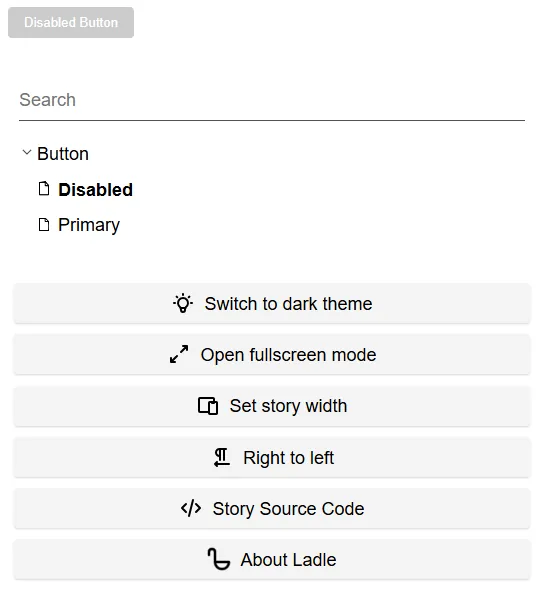
};跑 npm run ladle → 自動掃描所有 *.stories.tsx,瀏覽器開個 sidebar 列出所有 stories。
Production 不會包含 stories 檔
dev-only 機制Ladle 的 *.stories.tsx 不會被你的 production bundler(Webpack / Vite)當作 entry point,只有跑 ladle serve / ladle build 才會掃。所以可以放心寫,部署時不影響 bundle 大小。
當然,前提是 *.stories.tsx 沒有被你 app code 直接 import —— 不要跨檔引用 stories,維持單純 dev 工具。
Controls(動態調整 props)
import { Story } from '@ladle/react';
import { Button } from './Button';

export const Configurable: Story<{
  text: string;
  disabled: boolean;
  variant: 'primary' | 'secondary';
}> = ({ text, disabled, variant }) => (
  <Button disabled={disabled} variant={variant}>{text}</Button>
);

Configurable.args = {
  text: 'Hello',
  disabled: false,
  variant: 'primary',
};

Configurable.argTypes = {
  variant: {
    options: ['primary', 'secondary'],
    control: { type: 'select' },
  },
};Sidebar 會出現可調整 panel,即時改 props 看效果。