從現在開始改用Next.js
從現在開始改用 Next.js
TL;DRNext.js 三大殺手鐧:檔案即路由(pages/about.tsx → /about)、多種渲染策略(SSR/SSG/ISR/CSR 同專案混用)、內建優化(Image / Font / Script / Link)。2025 起 React 官方移除 CRA 推薦,新專案直上 Next.js 是最穩選擇。
入門參考
為什麼換掉 CRA / 純 React
| 項目 | CRA / 純 React SPA | Next.js |
|---|---|---|
| Routing | 要裝 react-router | 檔案即路由,零設定 |
| SEO | ❌ 純 CSR,SEO 弱 | ✅ SSR/SSG 出貨,Google 友善 |
| 圖片優化 | 要自己處理 | <Image> 內建 WebP/AVIF/lazy |
| 字體 | 要自己 link / preload | next/font 內建 |
| API Route | 要另外架後端 | /api/* 同 repo 寫 API |
| 部署 | 要選 host + 設定 | Vercel 一鍵部署 |
| 維護狀態 | ⚠️ CRA 已 deprecate | ✅ 官方推薦 |
檔案即路由
以前要這樣寫:
// React Router v6
<BrowserRouter>
  <Routes>
    <Route path="/" element={<Home />} />
    <Route path="/about" element={<About />} />
    <Route path="/posts/:id" element={<Post />} />
  </Routes>
</BrowserRouter>
Next.js 直接:
pages/                      app/                  (App Router 13+)
├── index.tsx               ├── page.tsx
├── about.tsx               ├── about/
└── posts/                  │   └── page.tsx
    └── [id].tsx            └── posts/
                                └── [id]/
                                    └── page.tsx
==檔案路徑 = URL 路徑==,不用寫 router config。動態路由用 [id],catch-all 用 [...slug]。
兩種 Router(Next.js 13+)
| Pages Router | App Router | |
|---|---|---|
| 入口 | pages/ | app/ |
| 預設 component | Client Component | Server Component |
| Layout | _app.tsx 全域 | layout.tsx 嵌套(各層) |
| Data fetching | getServerSideProps / getStaticProps | 直接 await fetch()(RSC) |
| Streaming | ❌ | ✅ |
| 推薦? | 既有專案維護 | 新專案首選 |
新專案直接用 App Router學習曲線略陡,但是 Next.js 未來主軸。Server Components 改變了「資料怎麼跟元件結合」的思維,值得學一次。
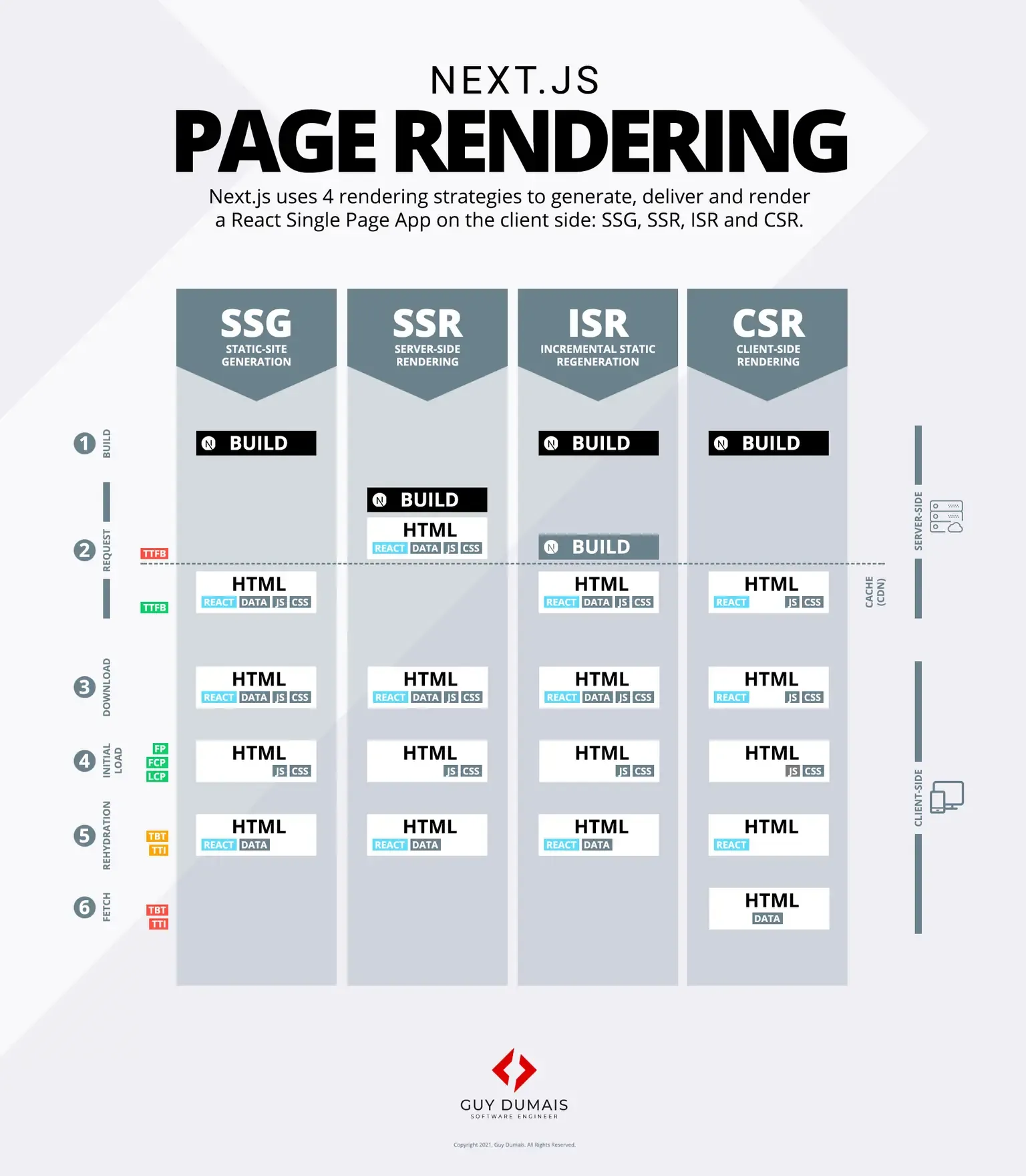
渲染策略對比(Next.js 殺手鐧)
| 策略 | 何時生成 HTML | 適合 |
|---|---|---|
| SSG(Static Site Generation) | build 時 預生成 | 部落格、行銷頁、文件 |
| SSR(Server-Side Rendering) | 每次 request 即時生成 | dashboard、個人化頁面 |
| ISR(Incremental Static Regeneration) | build 時生成 + 背景定期重生 | 商品頁(資料偶爾更新) |
| CSR(Client-Side Rendering) | browser 跑 JS 才有內容 | 後台、互動高的工具 |
同一專案可以混用,用每頁適合的策略。
// SSG(Pages Router)
export async function getStaticProps() { /* ... */ }

// SSR
export async function getServerSideProps() { /* ... */ }

// ISR
export async function getStaticProps() {
  return { props: {...}, revalidate: 60 };  // 60 秒重生一次
}
App Router 等價寫法:
// SSG(預設)
export default async function Page() {
  const data = await fetch(url, { cache: 'force-cache' });
  return <div>{data}</div>;
}

// SSR
export default async function Page() {
  const data = await fetch(url, { cache: 'no-store' });
}

// ISR
export default async function Page() {
  const data = await fetch(url, { next: { revalidate: 60 } });
}
localStorage 跟 SSR 的衝突
這是 Next.js 新手最常踩的雷。localStorage 只在 browser 才有,SSR 階段沒有 → 寫 localStorage.getItem(...) 直接炸。
正確寫法:useEffect 包
const initialState = [
  { id: '1', text: 'Option 1' },
  { id: '2', text: 'Option 2' },
];

const [items, setItems] = useState<Item[]>(initialState);

// ✅ 用 useEffect 讀(只在 client 跑)
useEffect(() => {
  const stored = localStorage.getItem('option');
  if (stored) {
    setItems(JSON.parse(stored));
  }
}, []);

// ✅ items 變化時寫回
useEffect(() => {
  if (items !== initialState) {
    localStorage.setItem('option', JSON.stringify(items));
  }
}, [items]);
注意 hydration mismatch如果 SSR HTML 用 initialState 渲染,但 client 立刻從 localStorage 讀到不同值 → React 警告 hydration mismatch。解法:加一個
mountedstate,首次 render 仍用 initial,mount 後才切換。
const [mounted, setMounted] = useState(false);
useEffect(() => setMounted(true), []);

if (!mounted) return <Skeleton />;   // 避免閃爍
return <ActualUI />;
App Router 的 Server Components 革命
// app/blog/[slug]/page.tsx — 這就是個 Server Component
export default async function BlogPost({ params }) {
  // ✅ 直接 await,不用 getServerSideProps
  const post = await db.post.findUnique({ where: { slug: params.slug } });

  return (
    <article>
      <h1>{post.title}</h1>
      <p>{post.content}</p>
    </article>
  );
}
重點:
- DB 查詢直接寫在元件裡,API endpoint 都不用寫
- DB credentials 不會洩漏到 client(只在 server 跑)
- Bundle 不會包這個元件(只 ship HTML)
需要互動的部分用 'use client' 切出來:
'use client';
import { useState } from 'react';

export function LikeButton() {
  const [count, setCount] = useState(0);
  return <button onClick={() => setCount(c => c + 1)}>❤️ {count}</button>;
}
常用內建優化
<Image>
import Image from 'next/image';

<Image
  src="/hero.jpg"
  alt="Hero"
  width={800}
  height={600}
  priority             // LCP 圖片加 priority
/>
自動 WebP/AVIF、自動 lazy loading、自動 srcset、避免 CLS。
next/font
import { Inter } from 'next/font/google';

const inter = Inter({ subsets: ['latin'] });

<html className={inter.className}>...</html>
build time 下載字體 + self-host + 自動 swap,沒有 CLS 也沒有 FOUC。
<Link>
import Link from 'next/link';

<Link href="/about" prefetch>About</Link>
hover 預先 prefetch 目標頁面 JS,點擊瞬間切換,沒有白屏。
部署:Vercel 一鍵
git push
# Vercel webhook 自動 build + deploy
Vercel 是 Next.js 母公司,部署體驗最完整(preview deploy、環境變數、Edge Functions、Analytics)。其他 host(Cloudflare Pages / Netlify / 自架 Node)也支援。
進階主題(下次再寫)
- Server Actions(取代 API Route 的新做法)
- Streaming + Suspense(漸進式渲染)
- Parallel Routes / Intercepting Routes(複雜 layout)
- Edge Runtime 部署
- Middleware 做 auth / redirect