Human套件教學
Human 套件 — 瀏覽器端 AI 偵測
TL;DRvladmandic/human 是 純瀏覽器執行 的 AI 套件,做人臉、姿勢、手勢、情緒、年齡、性別、物件偵測。重點是 backend 選對(WebGL / WASM / CPU),行動裝置(尤其 iOS Safari)有 OOM 與 OffscreenCanvas 限制。
Backend 選擇(決定效能跟相容性)
官方文件Backends · vladmandic/human Wiki
| Backend | 速度 | 啟動時間 | 相容性 | 推薦 |
|---|---|---|---|---|
| HumanGL(預設,客製 WebGL) | ⭐⭐⭐⭐⭐ | 中 | 現代 GPU | ✅ Browser 預設 |
| WebGL | ⭐⭐⭐⭐ | 中 | 普遍 | ✅ |
| WASM | ⭐⭐⭐ | 快 | 廣 | ✅ iOS / 低階裝置 |
| CPU | ⭐ 慢 | 快 | 全 | ❌ 不推薦 |
HumanGL 是什麼
Human 內建的客製 WebGL backend,在標準 WebGL 上加了:
- 特定 WebGL 設定優化(讓 warmup 更快)
- 繞過某些瀏覽器的 WebGL bug
- 對 Human 模型的特化 op 優化
這是 browser 端預設選擇,效能最好。
WASM 何時用
const config = {
  backend: 'wasm',
  modelBasePath: 'https://cdn.jsdelivr.net/npm/@vladmandic/human/models',
  // ...
};
適用情境:
- iOS Safari(WebGL 在某些版本不穩)
- 沒 GPU 的設備(老電腦)
- 需要在 Web Worker 裡跑(Worker 對 WebGL 支援不一致)
WASM 注意:
- 啟用 WASM SIMD 才會快(瀏覽器 flag 大多預設開)
- 圖片解碼較慢,要先把 input 縮小(webcam 1280×720 縮成 640×360)
iOS Safari OOM 大坑(我親身踩過)
症狀
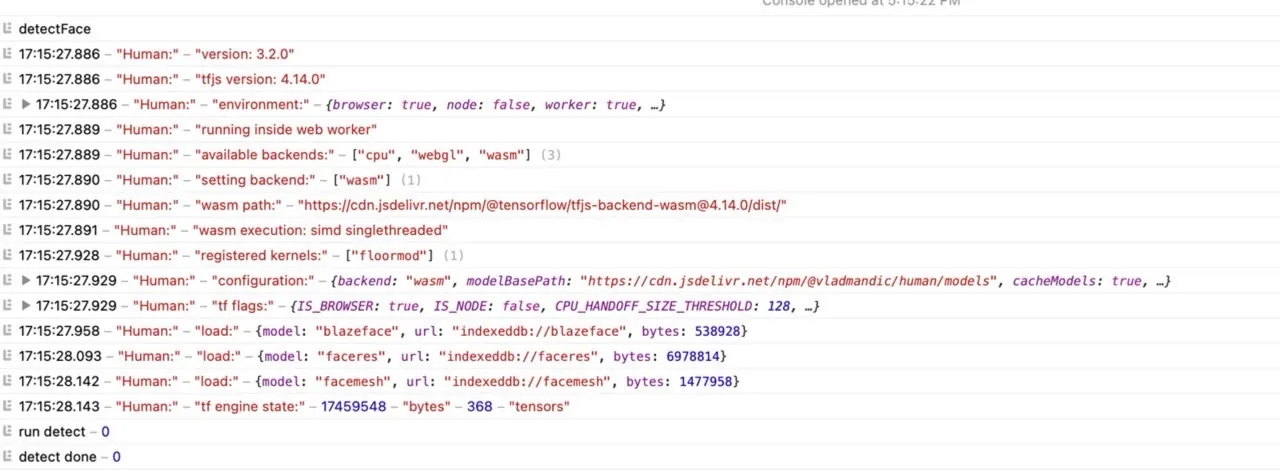
iPhone SE 2(iOS 17.2.1)上跑 Human face detection,連續上傳超過 20 張圖後 Safari 會自動 refresh page,有時跳「A problem repeatedly occurred」彈窗。Windows 上同 code 完全正常。
環境
// 配置
{
  backend: 'wasm',
  modelBasePath: 'https://cdn.jsdelivr.net/npm/@vladmandic/human/models',
  face: {
    enabled: true,
    emotion: { enabled: false },
    age: { enabled: false },
    gender: { enabled: false },
    iris: { enabled: false },
  },
  body: { enabled: false },
  hand: { enabled: false },
  object: { enabled: false },
  gesture: { enabled: false },
  segmentation: { enabled: false },
}
只開 face detector,其他全關 —— 即便如此 iOS 還是 OOM。
跨裝置測試結果
| 裝置 | iOS 版本 | Worker 模式 | 結果 |
|---|---|---|---|
| iPhone 15 Plus | 17.1 | ✅ | OK |
| iPhone SE 3 | 16.6 | ✅ | NG(不支援 OffscreenCanvas) |
| iPhone 11 | 17.2.1 | ✅ | NG |
| iPhone SE 2 | 17.2.1 | ✅ | NG |
| iPhone SE 2 | 17.2.1 | ❌(關 worker) | OK |
結論(作者回覆 + 自測)
iOS Safari 限制
- Web Worker 模式必須要
OffscreenCanvas支援,iOS Safari 17.0+ 才有- 即便支援,iOS Safari 仍有 memory leak(原因未明,可能 WebKit bug)
- 解法:在 iOS 上 disable worker 模式,改用 main thread
// User-Agent 偵測 + 動態關閉 worker
const isIOS = /iPad|iPhone|iPod/.test(navigator.userAgent);
const useWorker = !isIOS;  // iOS 不用 worker
Memory leak 是 WebKit / iOS Safari 問題不是 Human bug作者建議:啟用 config.face.detector.return = false(或保持 false)、保持 disposed,但 我測試過 memory 還是會增長。這是 iOS Safari 的 WebKit 限制,要等 Apple 修。
監測 memory
// 開發時看 memory
const used = performance.memory?.usedJSHeapSize;
console.log(`Heap: ${(used / 1024 / 1024).toFixed(2)} MB`);
Mac Web Inspector 可遠端 debug iPhone Safari,但 performance.memory 在 Safari 上不存在,要用 Web Inspector 的 Timelines / Allocations panel。
基本使用範例
Next.js + Human(face detection only)
'use client';
import { useState, useEffect, useRef } from 'react';
import Human from '@vladmandic/human';

const config = {
  backend: 'wasm' as const,
  modelBasePath: 'https://cdn.jsdelivr.net/npm/@vladmandic/human/models',
  face: { enabled: true },
  body: { enabled: false },
  hand: { enabled: false },
  // ...
};

export default function FaceDetect() {
  const [human, setHuman] = useState<Human | null>(null);
  const [result, setResult] = useState<any>(null);

  useEffect(() => {
    const init = async () => {
      const h = new Human(config);
      await h.load();
      await h.warmup();
      setHuman(h);
    };
    init();
  }, []);

  const handleImage = async (file: File) => {
    if (!human) return;
    const img = await loadImage(file);
    const r = await human.detect(img);
    setResult(r);
  };

  return (
    <input
      type="file"
      accept="image/*"
      onChange={(e) => e.target.files?.[0] && handleImage(e.target.files[0])}
    />
  );
}

async function loadImage(file: File): Promise<HTMLImageElement> {
  return new Promise((resolve) => {
    const img = new Image();
    img.onload = () => resolve(img);
    img.src = URL.createObjectURL(file);
  });
}
Web Worker 版(需要 OffscreenCanvas,iOS 慎用)
// human.worker.ts
import Human from '@vladmandic/human';

const human = new Human({ /* config */ });
await human.load();

self.onmessage = async (e: MessageEvent) => {
  const { imageData } = e.data;
  const result = await human.detect(imageData);
  self.postMessage(result);
};
同電腦兩瀏覽器表現不一致
過去也踩過這個坑:同台 Windows 10、同 React code、同一張正臉照片,在 某些瀏覽器跑出空 array(no face detected),其他正常。
觀察
- 同網址在 Chrome / Edge 表現不一
- 連 Human 官方 demo 在問題瀏覽器也 fail
- demo/facedetect/ → ❌ no detection
- demo/ → ✅ 正常
原因 + 解法
是預設 backend(HumanGL / WebGL)在某些 GPU/driver 組合下不穩。解法:
{
  backend: 'wasm',  // ⭐ 切到 WASM 就好
}
WASM 跑在 CPU,跨平台一致性更好,雖然慢一點但 絕對能跑。對「上傳圖片」型應用差別不大,但 webcam realtime 會明顯卡。
Configuration 重點選項
const config: Partial<Config> = {
  backend: 'wasm',                    // 'humangl' | 'webgl' | 'wasm' | 'cpu'
  modelBasePath: 'https://cdn.jsdelivr.net/npm/@vladmandic/human/models',
  debug: false,                       // 開了會 console.log 詳細資訊
  cacheSensitivity: 0.7,              // 0~1,高 = 跳過更多幀(效能 vs 即時性)
  face: {
    enabled: true,
    detector: { rotation: false, maxDetected: 10 },
    mesh: { enabled: false },         // 468 點面網,吃資源
    iris: { enabled: false },         // 虹膜偵測
    description: { enabled: false },  // 人臉特徵向量
    emotion: { enabled: false },      // 情緒
    age: { enabled: false },
    gender: { enabled: false },
  },
};
效能省記憶體準則只開你 真正需要 的模組。每個 enabled 子模組都會 load 一個額外的 model(每個 5-30MB),mesh 跟 description 最吃資源。
替代方案考量
| 方案 | 場景 | 比較 |
|---|---|---|
| Human | 多功能 AI(臉/手/姿勢/情緒) | 綜合最強 |
| MediaPipe(Google) | 單功能,如手勢 / 姿勢 | 模型較小、速度快 |
| face-api.js | 純人臉,老牌 | 已停更,別新用 |
| Tensorflow.js + 自訓 model | 自訂任務 | 工程量大 |
| 後端 API(AWS Rekognition / Google Vision) | 不在乎隱私、要高準確 | 要錢、要傳圖到雲 |
為什麼選 Human隱私(不傳圖到雲)+ 離線運行(裝完不用 server)+ 功能多。代價就是 client device 性能瓶頸,所以 backend 選擇很重要。